Pages

Friday, January 2, 2026

Broadcom Security Portfolio vs Competitors

Here’s a clear, comparable overview of how VMware’s security portfolio (Broadcom’s VMware vDefend) stacks up against key competitors like Palo Alto Networks, Cisco, and Fortinet in terms of features, use cases, and strengths — with practical context.


1. VMware vDefend (Broadcom) — Best for Private Cloud & Lateral Security
Image

Image

Image

Image

Core Strengths

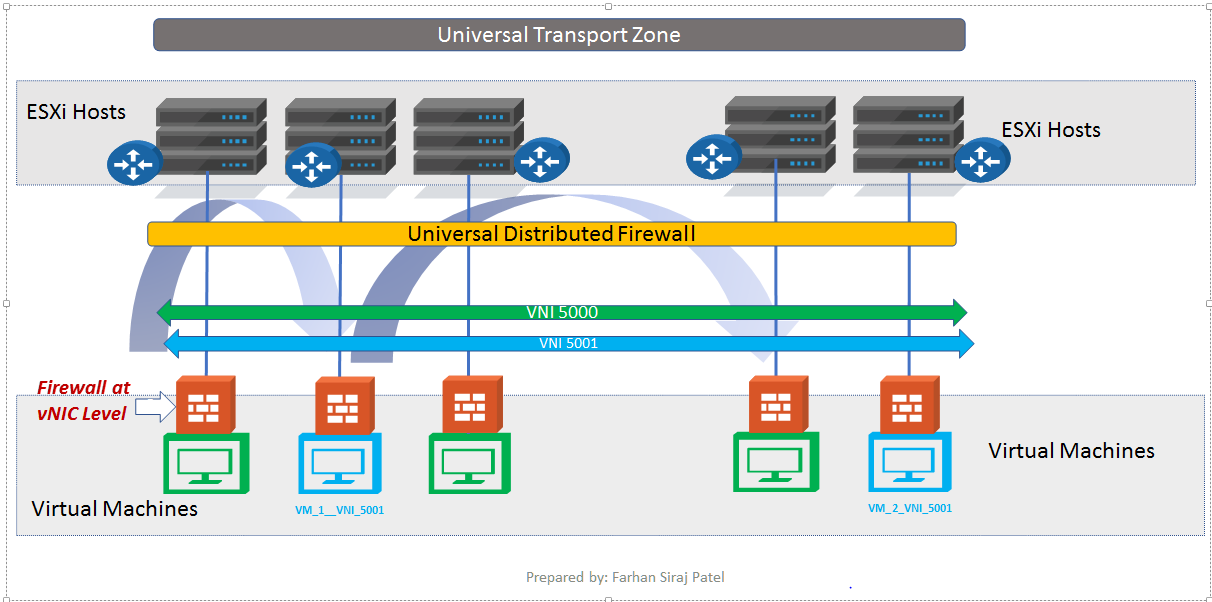
✔ Integrated Distributed Firewall (DFW):

  • Runs in the hypervisor (kernel) — cannot be disabled by malware inside a VM.

  • Enforces micro-segmentation policies directly at each workload (east–west).

  • Automatically follows workloads across hosts and vMotion. (VMware Blogs)

✔ Zero Trust & Lateral Security:

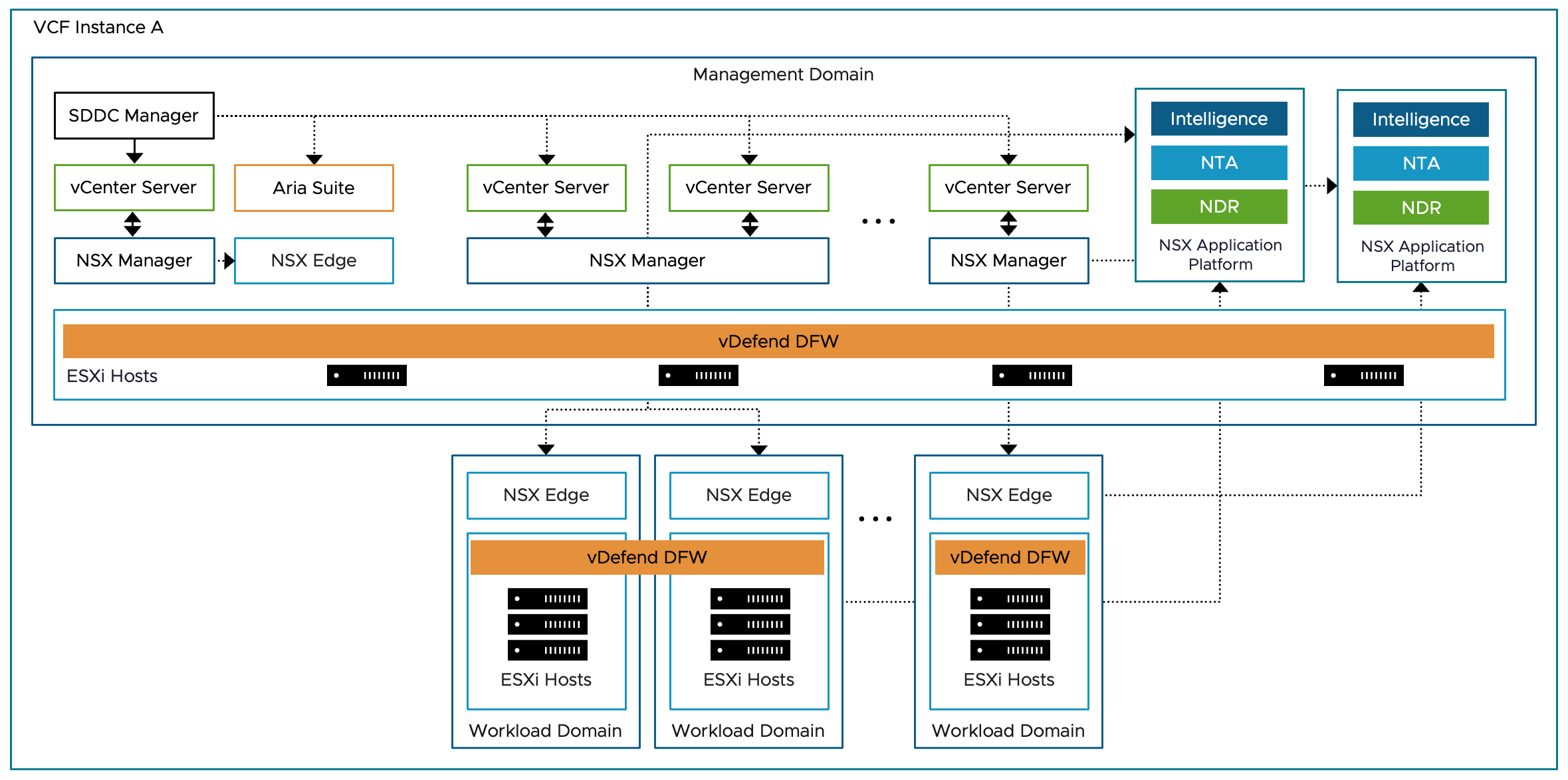
  • Deep integration with VMware Cloud Foundation (VCF) — enables strong Zero Trust inside private cloud environments.

  • Tag-based policies simplify segmentation at scale. (VMware Blogs)

✔ Built-in Threat Intelligence & NDR:

  • Network Detection & Response (NDR) with enhanced threat intel for air-gapped environments.

  • Advanced threat detection including malware and multi-stage attack correlation. (Broadcom Investors)

✔ Security Intelligence & Automation:

  • Security Segmentation Assessment reports provide visibility and recommendations.

  • “Micro-segmentation as code” and API-driven policies for automation and integration. (Broadcom Investors)

✔ IaaS & Workload Protection:

  • Native support for VMs, containers, and integration with VMware Cloud.

  • Fileless malware defense and deeper policy rule analysis. (VMware Blogs)


 2. Palo Alto Networks — Best for Enterprise Zero Trust & NGFW
Image

Image

Image

Image

Core Strengths

✔ Next-Generation Firewall (NGFW):

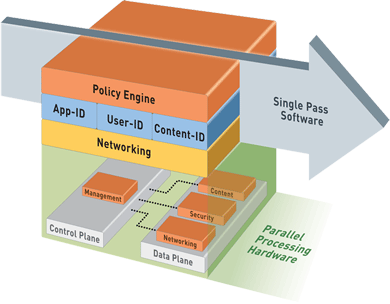
  • Deep application inspection, user identification, content filtering, and threat prevention.

  • Proprietary SP3 architecture designed for high-performance with security services enabled. (Palo Alto Networks)

✔ True Zero Trust Platform:

  • Continuous trust verification and traffic inspection across users, devices, and apps.

  • Integration with identity stores and SaaS security. (Palo Alto Networks)

✔ Threat Intelligence & AI:

  • AI-driven detection and analysis to block zero-day and evasive threats.

  • Comprehensive DNS security, DLP, and advanced URL filtering. (CBT Nuggets)

✔ Cloud & SASE Integration:

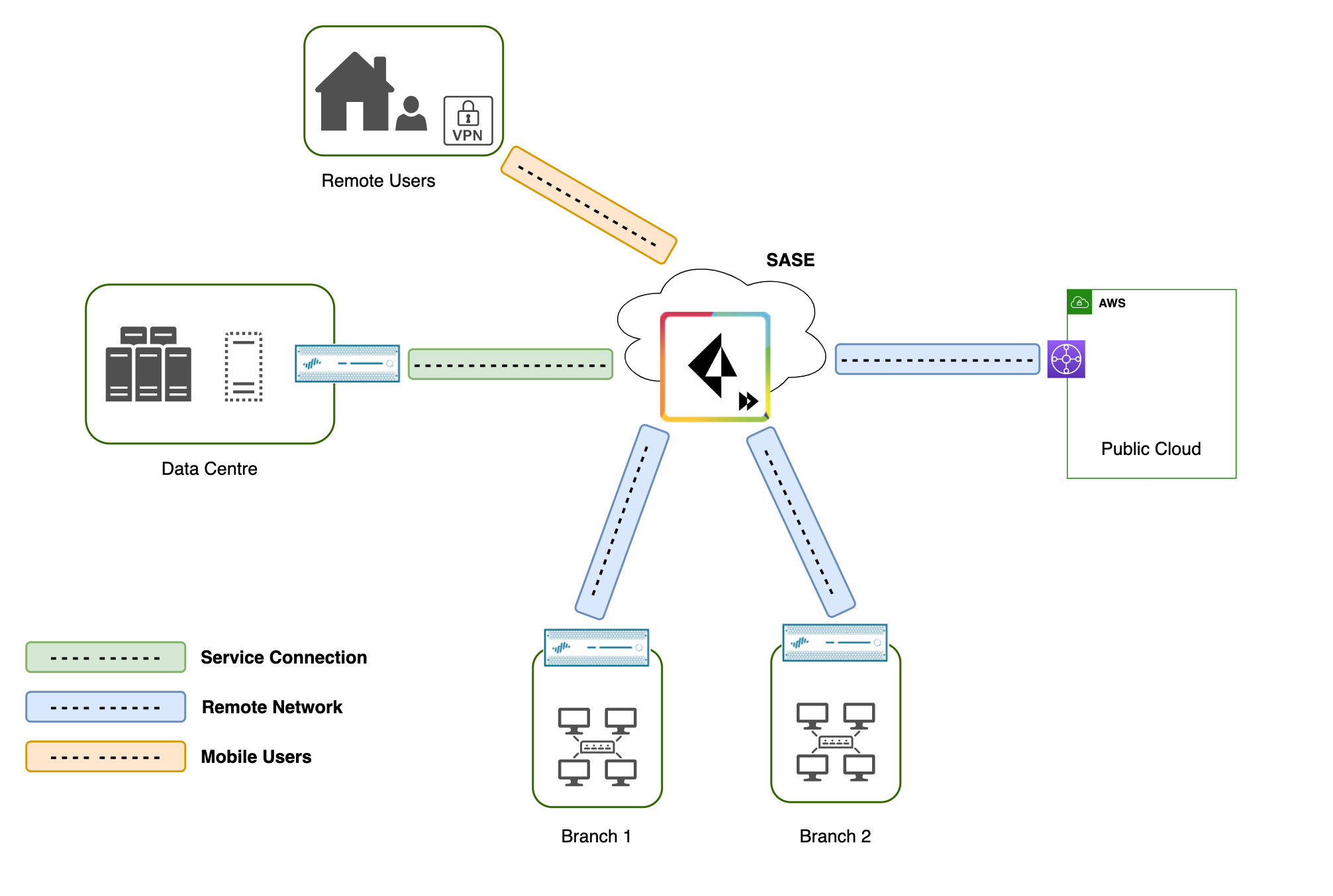
  • Strong support for cloud security via Prisma Access (SASE).

  • Provides secure access for remote users and hybrid environments. (Gartner)

When it excels vs VMware:
Better suited for enterprise perimeter and WAN security, broad Zero Trust across hybrid cloud/remote users, and integrated threat intelligence across networks, endpoints, and cloud.


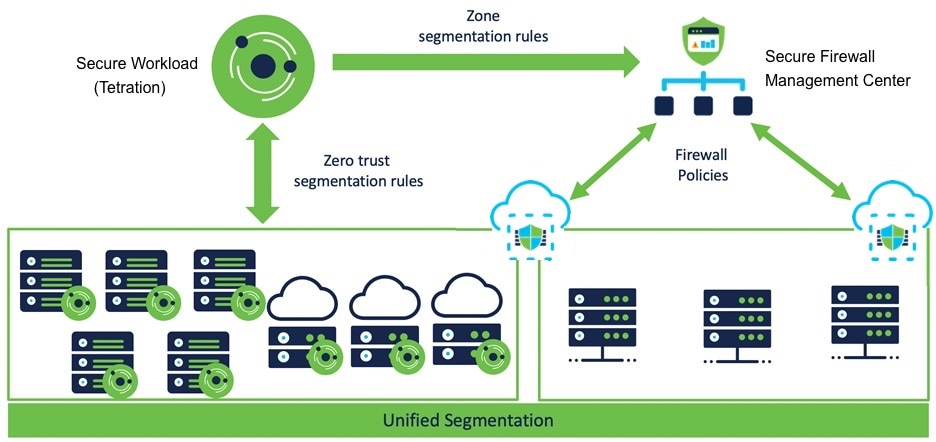
 3. Cisco Secure (Best for Hybrid & Multi-Vendor Ecosystems)
Image

Image

Image

Image

Key Features

✔ Broad Security Suite:

  • Secure firewall + threat detection + endpoint/identity integration (TALOS threat intel). (Cisco)

✔ Hybrid Environment Strength:

  • Works well where organisations already use Cisco networking and security gear.

✔ Threat Intelligence Integration:

  • Global threat feed with incident response backing.

Caveats Compared to VMware:

  • Not as strong at hypervisor­-level micro-segmentation inside private clouds.

  • Often requires additional infrastructure for deep east–west segmentation.


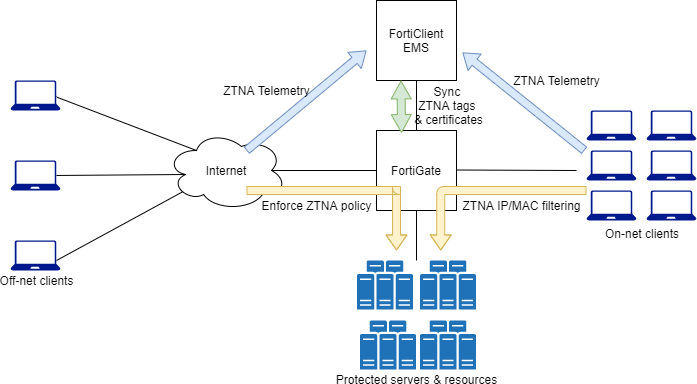
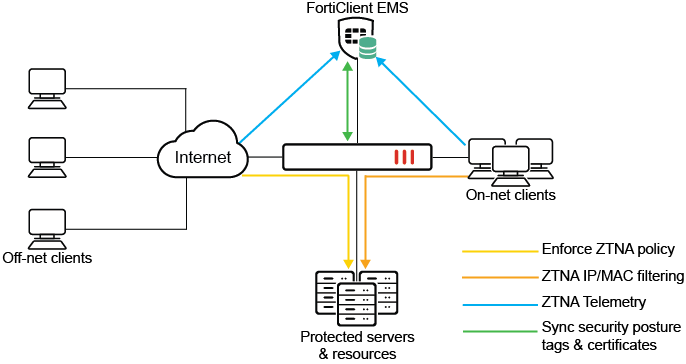
 4. Fortinet — Best for Cost-Effective NGFW & SD-WAN Bundles

Image

Image

Image

Image

Key Features

✔ All-In-One Security:

  • Firewall, IPS, UTM, SD-WAN, and some ZTNA support in one platform. (TechRepublic)

✔ Good Value & Deployability:

  • Strong value in terms of cost performance, integrated SD-WAN, basic Zero Trust. (Fortinet)

✔ Ease of Deployment:

  • Often simpler to configure for perimeter/internal segmentation.

Limitations vs VMware/Palo Alto:

  • Micro-segmentation and deep workload protection not as advanced.

  • Feature parity across platforms is inconsistent. (Palo Alto Networks)


 Side-by-Side Capabilities Comparison

Feature / CapabilityVMware vDefend (Broadcom)Palo Alto NetworksCisco SecureFortinet FortiGate
Micro-segmentationNative hypervisor-embedded (true east-west) (VMware Blogs)Available via integrations but not hypervisor levelLimitedLimited
Distributed FirewallYes (kernel-level) (VMware Blogs)NGFW (edge/segment)NGFWNGFW
Threat Detection & ResponseBuilt-in NDR w/ advanced threat analytics (Broadcom Investors)Strong AI + threat intelGood global threat intel (Cisco)Decent but less advanced
Zero Trust SupportStrong for workloads & private cloud (VMware Blogs)Holistic enterprise (users + devices + cloud) (Palo Alto Networks)ModerateBasic
Cloud/SASEVMware Cloud integratedStrong via Prisma Access (Gartner)GoodBasic
Automation & Policy IntelligenceAPI-driven segmentation, rule analysis (VMware Blogs)Automation + MLSome automationSome automation
Best FitPrivate cloud / VMware environmentsEnterprise hybrid multi-cloud Zero TrustHybrid orgs with Cisco infraSMB / cost-sensitive environments

How to Pick Based on Use Case

Private Cloud & Workload Security

⇒ VMware vDefend (Broadcom)
Best for deep east–west segmentation, Zero Trust inside VMware Cloud, and scalable protections embedded into the hypervisor. Ideal when VMware Cloud Foundation is core infrastructure.


Enterprise WAN & Zero Trust Across Users + Cloud

⇒ Palo Alto Networks
Leads in NGFW + SASE + Zero Trust platform, protecting perimeter, remote users, cloud SaaS, and mobile devices with integrated threat intelligence and AI.


Hybrid Multi-Vendor Networks

⇒ Cisco Secure
Strong when you already run Cisco network/security gear, want integrated threat feeds and compliance support.


 Final Summary

VMware vDefend (Broadcom)
✔ Deep distributed firewall and micro-segmentation built into the hypervisor
✔ Strong lateral security & Zero Trust inside private clouds
✔ API automation & rule analysis tools
✔ Tight integration with VMware Cloud Foundation

Competitors

  • Palo Alto Networks: Stronger multi-cloud/perimeter Zero Trust and AI-driven threat protection

  • Cisco Secure: Good hybrid security with global threat intel

  • Fortinet: Balanced security + SD-WAN at better cost but weaker internal segmentation


Thursday, January 1, 2026

VMware vDefend Distributed Firewall (DFW)

This explains why lateral movement is one of the biggest data-center security risks and how VMware vDefend Distributed Firewall (DFW) solves it using zero-trust, micro-segmentation, and AI-assisted security, all enforced directly at each VM’s network interface (vNIC).


Why This Matters (The Problem)

  • 44% of breaches involve lateral movement

  • Breaches take ~204 days to detect

  • Average breach cost is $4.35M

  • Traditional security focuses only on perimeter firewalls

  • Once attackers get inside, they can move freely between workloads

Perimeter-only security is no longer enough.


Traditional Firewall vs VMware vDefend DFW

 Traditional Firewalls

  • Protect only north–south traffic

  • No visibility into east–west (VM-to-VM) traffic

  • IP and subnet based → hard to manage

  • Require traffic hair-pinning

  • Hardware bottlenecks, hard to scale

  • Poor application and workload context

 VMware vDefend Distributed Firewall

  • Enforced inside the hypervisor kernel

  • Runs on every VM’s vNIC

  • Protects east–west traffic

  • No hair-pinning or extra appliances

  • Scales automatically as you add hosts

  • Independent of the guest OS (can’t be disabled by malware)

Every VM effectively gets its own firewall.


Key Benefits of vDefend Distributed Firewall

  • Stops lateral movement

  • Zero Trust enforcement

  • Kernel-space performance (faster & safer than in-guest agents)

  • Policy follows the VM (even during vMotion)

  • Fine-grained control from Layer 2 to Layer 7

  • Works for:

    • VMs

    • Containers

    • Bare-metal workloads


How Policies Work (Simple Explanation)

 Tags Instead of IPs

  • VMs are tagged with metadata like:

    • env:prod

    • tier:web

    • zone:PCI

  • Firewall rules are written using tags, not IPs

 When a VM is created or deleted, rules update automatically.


 Groups

Groups are dynamic collections of workloads based on:

  • Tags

  • VM names

  • OS type

  • IP/MAC

  • Active Directory users (Identity Firewall)

Used as:

  • Source

  • Destination

  • Apply-To scope


 Firewall Rules

A rule defines:

  • Source

  • Destination

  • Service (ports/protocols)

  • Context Profile (Layer 7 inspection)

  • Action (Allow / Deny / Reject)

  • Direction (Ingress / Egress)

  • Apply-To (where the rule is enforced)


 Apply-To (Unique vDefend Feature)

  • Rules are installed only on relevant VMs

  • Improves performance and scalability

  • Prevents unnecessary rule evaluation

 Example:

  • Dev VMs only get Dev-related rules

  • Prod VMs only get Prod-related rules


Layer 7 & Deep Inspection

vDefend can:

  • Inspect actual application payload

  • Validate traffic is truly:

    • HTTP

    • MySQL

    • TLS

  • Block fake or malicious traffic even if the port looks valid

 Prevents attacks that hide inside “allowed” ports.


Security Rule Categories (Order Matters)

  1. Ethernet – Layer 2 rules

  2. Emergency – Quarantine / break-glass rules

  3. Infrastructure – DNS, AD, NTP, DHCP

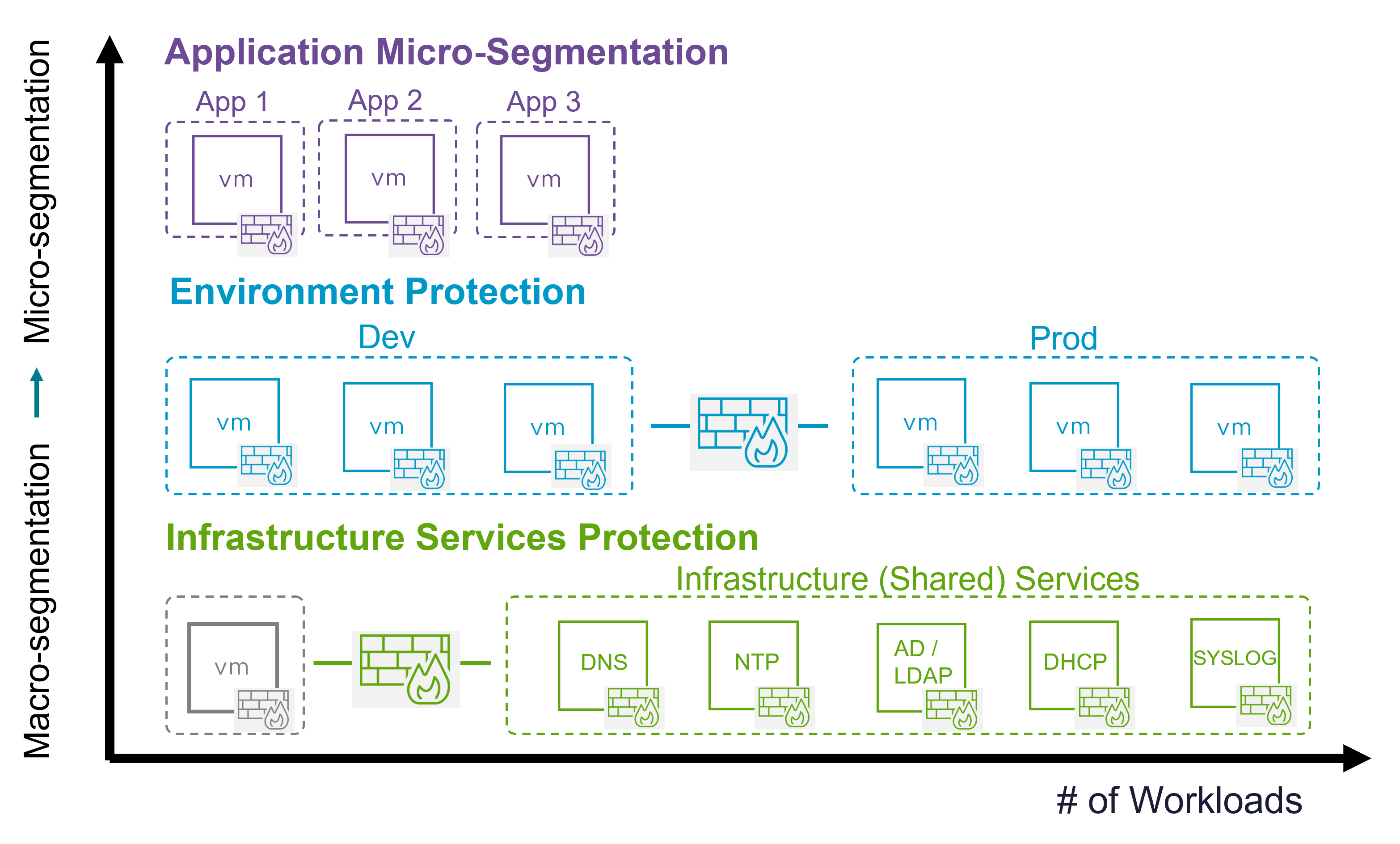
  4. Environment – Dev ↔ Prod ↔ PCI

  5. Application – App-to-app, tier-to-tier

  6. Default – Zero-trust allow/deny baseline

Rules are enforced top-down, left-to-right.


Main Use Cases (With Examples)

 Secure Infrastructure Services

Protect critical shared services like:

  • Active Directory

  • DNS

  • File servers

Example

  • App XYZ → DNS & AD → Allowed

  • App ABC → File Server → Denied


 Secure Virtual Zones (Macro Segmentation)

Isolate environments using tags:

  • Prod

  • Dev

  • QA

  • UAT

  • PCI

Example

  • Prod ❌ Dev

  • Prod ✅ UAT

  • Dev ❌ UAT

  • PCI isolated from non-PCI

All done with a few tag-based rules.


 Secure Applications (App-to-App)

Control which applications can talk to each other.

Example

  • App1 → App2 → Allowed

  • App3 → App4 → Blocked


 Micro-Segmentation (Inside the App)

Protect individual tiers within the same app—even on the same subnet.

Example

  • Web → App → Allowed

  • App → DB → Allowed

  • Web → DB → Denied

  • DB → DB → Denied

 Impossible with traditional firewalls.


 Compliance & Regulated Zones (PCI, HIPAA, ISO)

  • Strict access control per tier

  • Only approved apps can access PCI workloads

  • Supports audits and zero-trust compliance


Beyond Firewall: Full vDefend Security Portfolio

vDefend is not just a firewall:

  • Distributed Firewall

  • Gateway Firewall

  • IDS/IPS

  • Malware Prevention

  • NDR / NTA

  • Security Intelligence

    • App discovery

    • Rule recommendations

    • Security analytics

All managed from one unified platform.


Final Takeaway

VMware vDefend Distributed Firewall delivers zero-trust security by stopping lateral movement at the VM level—without redesigning your network.

It provides:

  • Micro & macro segmentation

  • High performance

  • Strong ransomware defense

  • Simplified operations

  • Scalability without hardware limits.

VMware Intelligent Assist (GenAI for Security)

This explains how VMware vDefend Intelligent Assist, powered by Generative AI (GenAI), helps security teams understand, investigate, and remediate cyber threats faster and more easily.


What Problem It Solves

  • Modern attacks (like ransomware) are multi-stage and complex

  • Security tools generate many low-level alerts

  • Analysts spend a lot of time:

    • Correlating events

    • Understanding attacker behavior

    • Figuring out how to respond

Intelligent Assist simplifies this entire process.


What Intelligent Assist Does

Uses AI to Understand Attacks

  • Correlates many low-level security events into a single attack campaign

  • Uses Network Detection & Response (NDR)

  • Combines signals from:

    • IDS/IPS

    • Malware detection

    • Anomaly detection

  • Maps attacks to the MITRE ATT&CK framework

Result: Instead of dozens of alerts, teams see one clear attack story.


Explains the Attack in Plain Language

With one click, Intelligent Assist:

  • Explains what happened

  • Describes the attack sequence, such as:

    • Trojan execution

    • Lateral movement

    • Command-and-control (C2)

    • Data staging and exfiltration

It even provides hypotheses about attacker intent.

 Result: Analysts don’t need to manually piece things together.


Allows Interactive Investigation

Security teams can:

  • Ask questions like:

    • “What happened in this campaign?”

    • “How was data exfiltrated?”

    • “What tools were used (e.g., Cobalt Strike)?”

    • “What are the indicators of compromise (IOCs)?”

 Result: Faster threat hunting and investigation.


Recommends and Automates Remediation

Intelligent Assist doesn’t just explain — it acts.

  • Suggests remediation strategies (basic to comprehensive)

  • Automatically creates:

    • Security groups

    • IDS/IPS rules

    • Firewall policies

  • Publishes remediation policies directly into vDefend

With a single click, teams can block malicious activity, such as:

  • Cobalt Strike C2 traffic

  • Trojan-related network communication

 Result: Faster response without manual rule writing.


How It Helps Teams Work Better Together

  • Security teams understand threats faster

  • Infrastructure teams apply fixes without complex network changes

  • Both teams collaborate through a shared, AI-driven view of attacks

This is especially valuable for ransomware defense, where speed matters.


Practical Usage Examples

 SOC Analyst

  • Quickly understand a complex, multi-stage attack

  • Ask AI to summarize attacker behavior

  • Identify IOCs and affected workloads

 Incident Response Team

  • Use AI-recommended remediation

  • Deploy blocking policies in minutes

  • Stop lateral movement and data exfiltration

 Infrastructure / Network Teams

  • Apply security fixes without deep security expertise

  • Avoid disruptive network redesigns

  • Respond confidently during emergencies

 Ransomware Defense

  • Detect early-stage activity

  • Contain the attack before encryption or extortion

  • Reduce blast radius automatically


Key Takeaway

VMware Intelligent Assist turns GenAI into a security copilot—helping teams understand attacks, investigate faster, and remediate threats with just a few clicks.

It reduces:

  • Alert fatigue

  • Investigation time

  • Human error during incident response

And increases:

  • Speed

  • Accuracy

  • Collaboration